
Platform overview
Every security service. One panel. One order of priority.
Buguardian scans networks and websites, watches for leaked credentials, tests staff with phishing simulations, patches endpoints and audits firewalls, Active Directory and databases. Every result lands in the same findings table, the same posture score and the same Watcher analysis.
The problem
More tools produced more reports. The fixes still wait.
A typical mid-sized company runs one product for vulnerability scans, another for phishing tests, a third for patching and a spreadsheet to remember when certificates expire. Each one writes its own report. None of them answers the question management asks: are we safer than we were last month? For a service provider, the problem multiplies by every customer.
Hundreds of rows, no order of priority
Separate tools produce separate lists. Nobody can say which item gets fixed first, or what it costs to leave it open.
“Where do we stand today?” has no answer
Last quarter's snapshot cannot be placed beside this quarter's. Effort is invisible to anyone who signs the budget.
An annual test, then eleven quiet months
The pentest report is filed away. The service opened the following month sits exposed, and the leak is heard from a third party.
How it works
Connect. Measure. Understand. Act.
Four steps, repeated. Each one leaves a record the next can build on, so the picture gets sharper instead of starting over.
- 01
Connect
Deploy one scanning appliance inside the network, verify your domains with a DNS record and install the endpoint agent. Web scanning and threat intelligence start from the verified domain.
- 02
Measure
Every service reports into the same findings table, and the posture score is recalculated from the latest completed result of each one.
- 03
Understand
Watcher reads the findings across all services, connects the ones that belong together and writes the briefing: what it observed, what it means, what to do first.
- 04
Act
Watcher prepares the fix — a patch rollout, a verification scan or an awareness campaign — and runs it once you approve. The next measurement shows what changed.
Security overview
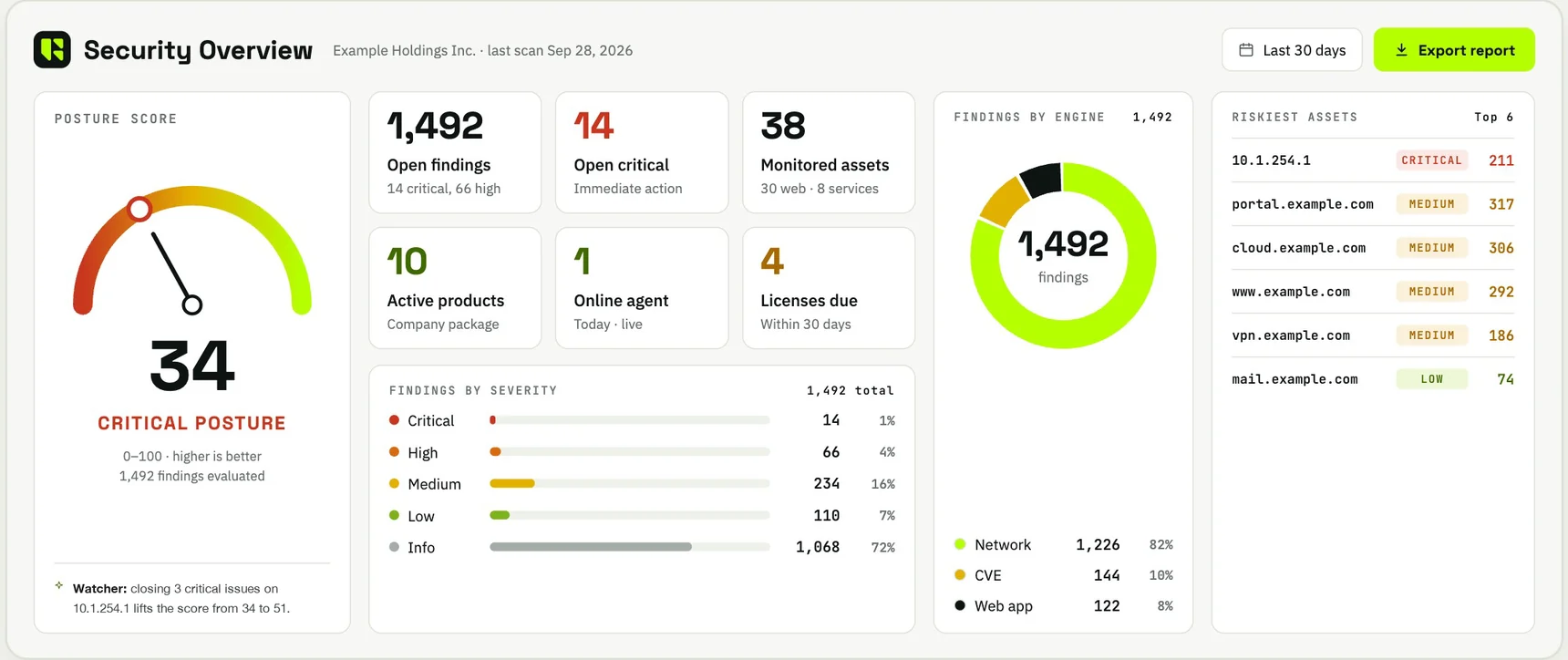
The first screen answers the first questions.
- Posture score and band
- Open findings by severity, and how many are critical
- Vulnerabilities that are being actively exploited
- How many services are healthy and how many have a visibility gap
- Licences expiring within 30 days
- The five riskiest assets and the most recent findings
Service catalogue
Fifteen services. Start with the ones you need.
Every service runs on its own and reports into the same findings table, the same posture score and the same Watcher analysis. You activate only what is relevant to your environment.
Vulnerability management
Network discovery, CVE analysis, scheduled and authenticated scans.
Web application scanning
Verified domains, subdomains, IP and cloud services.
SSL and IP reputation
Expiring certificates and blocklisted addresses.
Threat intelligence and DRP
Dark web, leaks, stealer logs, lookalike domains.
Phishing simulation
Campaigns, templates and per-person results.
Endpoint management
Inventory, missing updates, end-of-life software.
Patch management
Ring-by-ring rollouts inside maintenance windows.
Remote support
Per-company access with a second factor.
ThreatAuthenticator
Multi-factor authentication on user logins.
Firewall analysis
A grade from A to F, with the evidence attached.
AD health check
Directory hygiene checked daily, read-only.
Database health check
PostgreSQL and Microsoft SQL Server, read-only.
Availability monitoring
Service ports checked at regular intervals.
Managed VPN
Remote access managed from the same console.
DDoS simulation
Restricted, pre-approved resilience tests.
What you deploy
Deploy only what your environment needs.
Scanning appliance
Where you need internal visibility: an Ubuntu virtual machine with at least 4 cores, 8 GB of memory and 100 GB of disk. Monitoring targets and their credentials stay on the appliance in your network.
Domain verification
Verify a domain once with a DNS record. Web scanning, threat intelligence, certificate and blocklist monitoring start from there — nothing to install.
Endpoint agent
One agent per machine reports inventory, missing updates and vulnerabilities. Patch management and remote support are modules the agent installs itself when you assign them.
SaaS. Live in days, nothing to install for external services.
Multi-tenant
Built to be resold. Multi-tenant from the first screen.
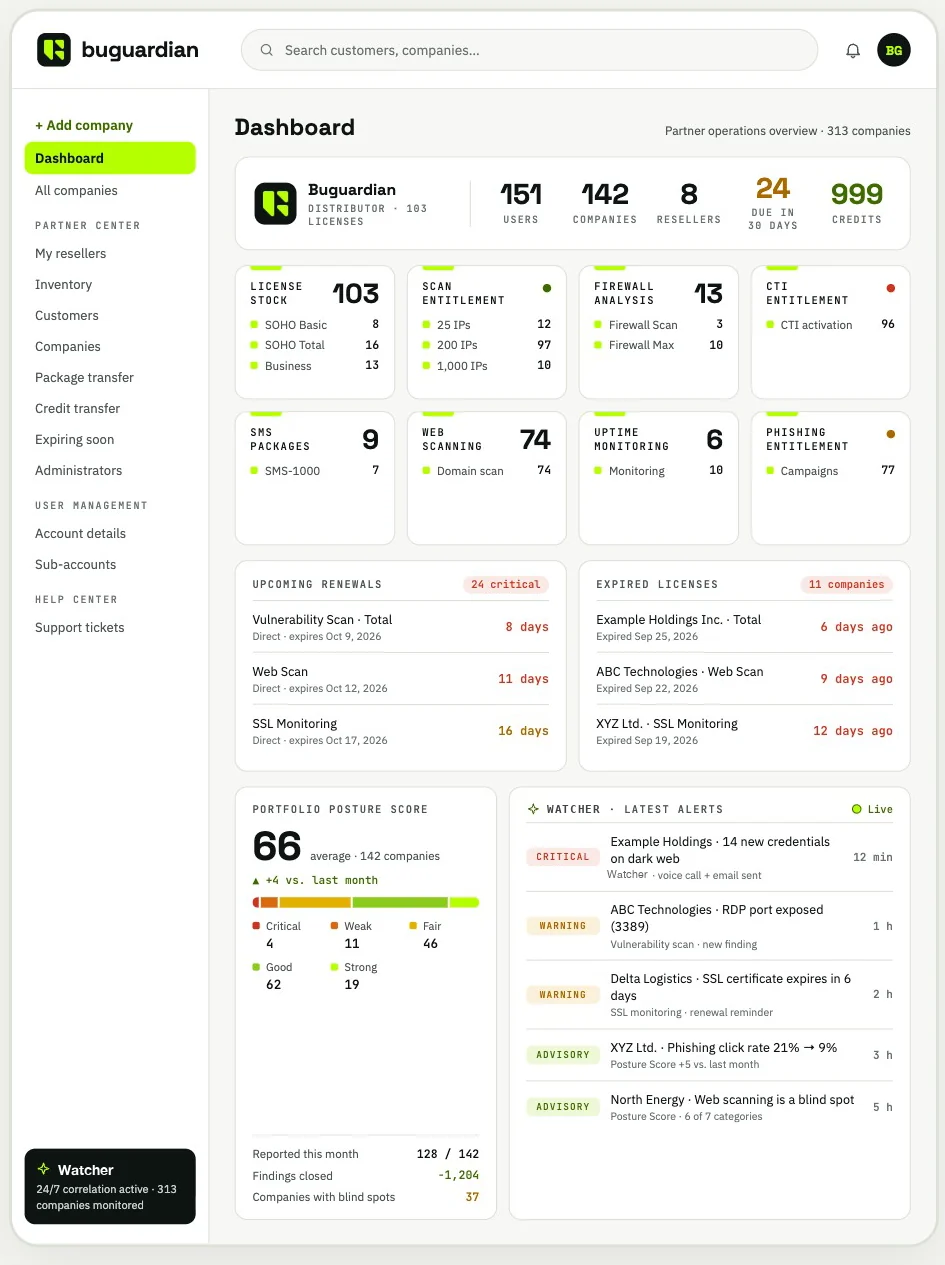
Distributors supply solution partners, partners supply customers, and every customer lives in its own isolated workspace. A partner managing three companies and a partner managing three hundred use the same screen, the same permission model and the same monthly rhythm.
- Three levels: distributor, solution partner, customer
- An isolated workspace for every customer; one login covers all of them
- Hold licences in stock, assign them from your own inventory
- See every renewal 90 days ahead
Partner structure
Trust
Details an auditor will ask about.
Approval before action
Watcher acts only after a person approves, and through the same controls as a manual operation.
Read-only audits
Directory and database audits are read-only. Nothing in Active Directory is created, changed or deleted.
Encrypted credentials
Scan credentials are stored with AES-256 encryption and never shown again. They can be limited to IP ranges.
Local stays local
Monitoring targets and their credentials stay on the appliance in the customer network, never in the cloud.
Careful rollouts
Patch rollouts go ring by ring. If the pilot ring fails, the next ring never opens.
Scoped remote access
Remote support access is granted per company and per capability, with a second factor.
Console languages: English, Turkish and Spanish. PDF reports carry full Unicode and multi-language support.
See the platform on a live tenant.
We walk you through a working environment: the findings table, the posture score, the Watcher briefing and the report your management would receive.